
Give a month, get a month
Your invite link and code, how a new restaurant claims it in its first 60 days, the Joined, Menu live and Month given statuses, and how the month is added.
Invite another restaurant to tamr. When it publishes its menu, you both get one month of Pro, once per restaurant you invite.
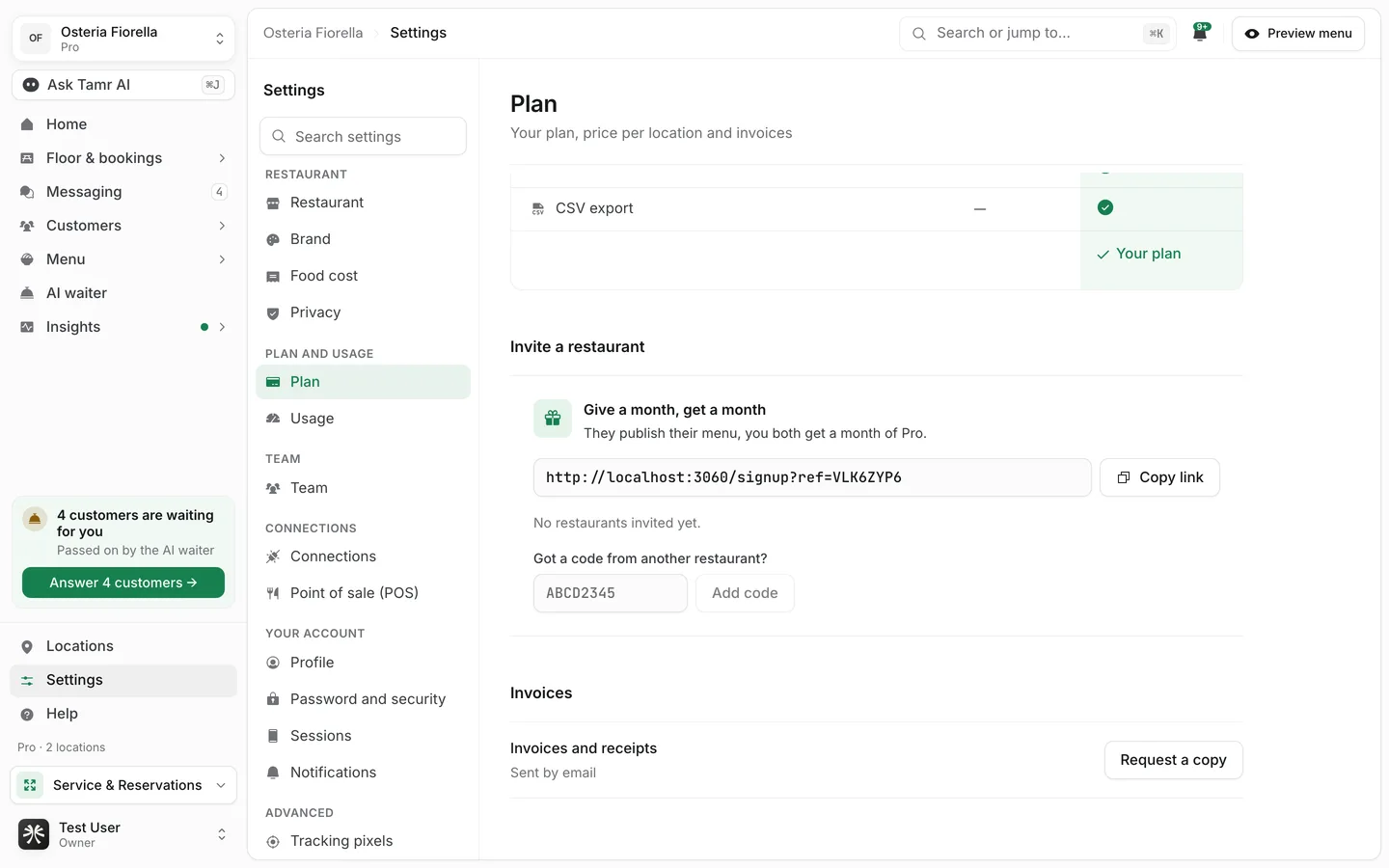
Where to find it
Settings → Planowners · adminsHelp menueveryoneInvite a restaurant
- 1Copy your link
Under Give a month, get a month, select Copy link. Your link ends in your restaurant's 8-character code, for example
?ref=VLK6ZYP6. - 2Send it
Send the link to the other restaurant's owner. When they sign up through it and set up their restaurant, your code is added for them. If they signed up another way, they can type the code instead.
- 3Follow their progress
Each restaurant that used your code is listed with its status.
JoinedstatusMenu livestatusMonth givenstatusAdd a code you were given
Signing up through an invite link adds the code automatically. If you signed up another way, add the code you received yourself, once, in your restaurant's first 60 days.
- 1Open the panel
Go to Settings → Plan and scroll to Invite a restaurant, or open Help → Give a month, get a month.
- 2Enter the code
Under Got a code from another restaurant?, type the 8-character code and select Add code. You see Code added.
- 3Publish your menu
Once your menu is live, both restaurants get their month. The panel then shows Invited by and the name of the restaurant that invited you.
How the month is added
The month of Pro is added to your real plan, so it shows on Settings → Plan and opens every Pro page.
On Free30 daysOn paid Pro+30 daysOn Pro with no end dateno changeThe month is given the next time either restaurant opens the panel after the menu goes live, so open Settings → Plan if it has not shown yet.
Rules
- One month each, once per invited restaurant.
- A restaurant can add only one code, and never its own.
- The two restaurants must be run by different people: a code is refused when anyone is on both teams.
- Codes are for new restaurants: they can be added in the first 60 days after the restaurant is created.
- Adding a code needs an owner or admin.
FAQ
The other restaurant signed up with my link but isn't listed.
The code is added when they set up their first restaurant from the same browser they opened your link in. If they signed up on another device, ask them to enter your code under Got a code from another restaurant?.
It says That code does not look right, or We could not find that code.
Check the 8 characters, which use capital letters and the numbers 2 to 9. A restaurant older than 60 days, or one that already used a code, cannot add another.
Is there a limit on how many restaurants I invite?
Each restaurant you invite that publishes its menu gives you another month, up to 500 restaurants.
Related
Last reviewed October 14, 2026