
Treat your regulars with On the House
How On the House works, choosing your gestures, who gets one, the weekly limit, where it runs, the Waiting board and the weekly numbers.
On the House gives small gestures to customers who come back. There are no points and nothing for the customer to collect. tamr notices a moment, such as a 5th visit or a birthday, tells your team what to bring from your own list, and nothing reaches the customer until someone on your team says yes. Open it from Customers → On the House.
On the House is a Pro feature. On Free the page shows the programme you could run, read-only, with Get Pro.
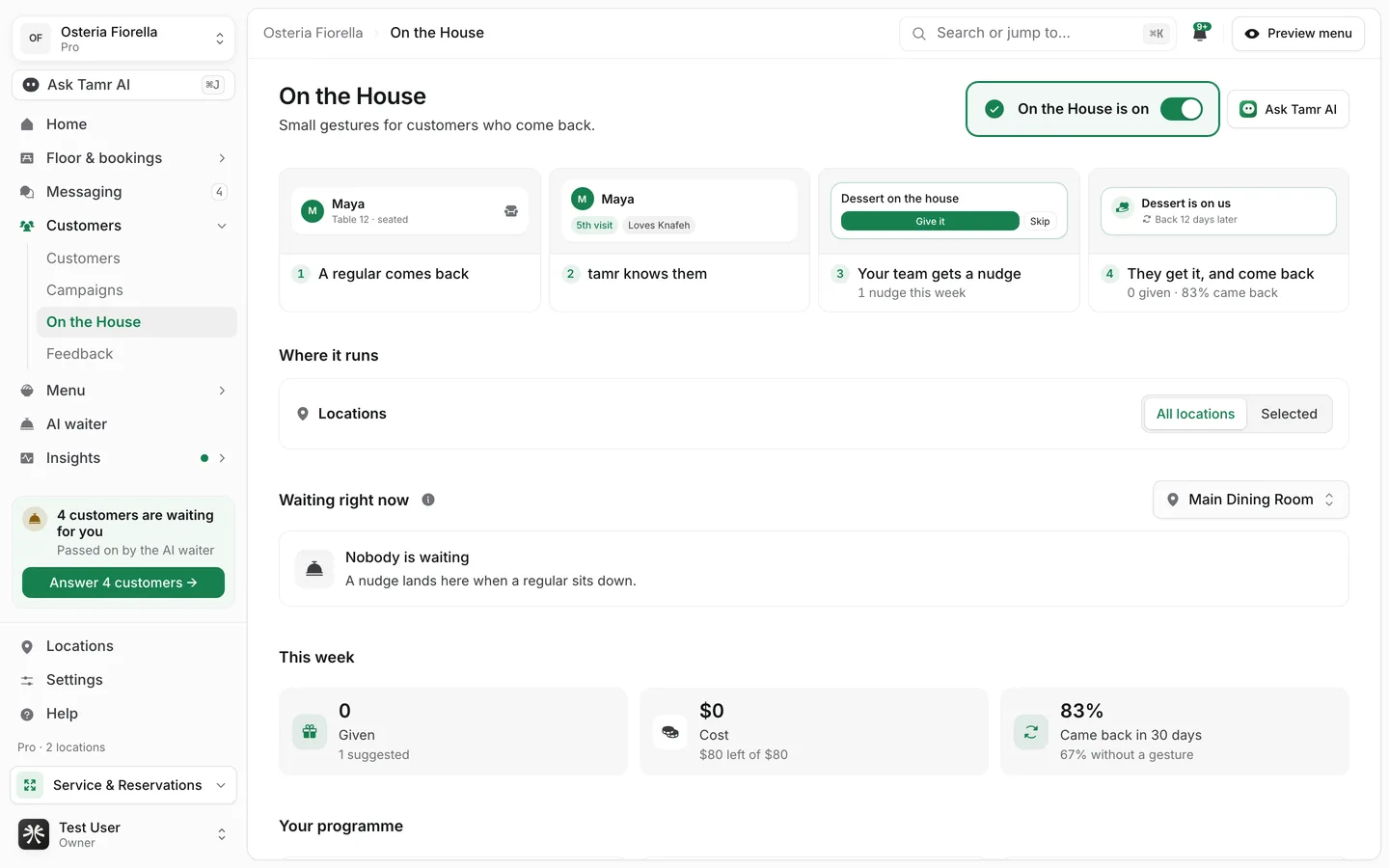
How it works
The four steps at the top of the page show the loop. Once it is running, your own numbers appear under them.
- 1A regular comes back
A customer tamr recognises sits down.
- 2tamr knows them
It sees the moment: their visit count, what they like.
- 3Your team gets a nudge
Your team sees the suggestion, with Give it and Skip.
- 4They get it, and come back
The customer sees the gesture on their phone, and tamr measures whether they return.
Set it up
Only owners and admins can set up On the House. The set-up is three questions, with a preview of what your team and the customer will see beside them.
- 1What do you want to give?
Your list starts empty. Add gestures from Ideas to add, or select Create your own. Switch each gesture on or off. To change one, select it: a dialog opens with What you give, What kind of gesture is it?, What the customer reads (leave it empty and tamr writes it), What it costs you, Note for your team and Contains alcohol. You can also type a request to Tamr AI, for example "add a free espresso for regulars".
- 2Who gets one?
Pick the moments that earn a gesture: A milestone visit (their 5th, 10th, 25th visit and so on), A birthday or a celebration, Back after a long gap (45 days away or more), After a visit that went wrong, Their second visit and Being a regular (their usual, a saved dish, a big table).
- 3How much per week?
Set Gestures a week, at most, between 1 and 1,000. Switch on Also stop at a weekly budget to stop at an amount as well; whichever comes first applies. tamr shows roughly what a week costs if every gesture is given.
Select Turn it on to start. Your team gets a nudge the next time a regular sits down.
Kinds of gesture
A dish from the menukindA small extrakindA table or a seatkindBeing knownkindA reason to come backkindChoose where it runs
With more than one location or menu, Where it runs lets you pick All locations or Selected locations, and All menus or Selected menus. With one of each there is nothing to choose.
Run it day to day
Once it is on, the page becomes a board in three parts.
Waiting right nowliveThis weeknumbersYour programmesummaryUnder More settings you find what was given in the last 3 hours and the finer limits: Days between gestures for one customer (30 by default), Gestures a year for one customer (4 by default), Customers left out, to measure (%), What the customer's phone calls it, Suggest on its own and Allow gestures with alcohol. To pause everything, use the switch at the top of the page; your list and limits are kept.
FAQ
Does a customer get anything without my team agreeing?
No. tamr only suggests. The customer sees the gesture once a member of your team presses Give it.
Why are some customers left out on purpose?
By default tamr skips 10% of customers who earned a gesture. Comparing them with the ones who got one is how Came back in 30 days tells you whether gestures bring people back sooner. Change the share under More settings.
Can a gesture include alcohol?
Only if you switch on Allow gestures with alcohol under More settings. It is off by default.
Related
Last reviewed October 14, 2026