
Control privacy and your data
Retention, contact-detail stripping, customer profiles, downloading your restaurant's data, and deleting your account or restaurant.
You decide how long customer conversations are kept and what is stored in them. Retention, stripping and your restaurant's data live under Settings → Privacy. Your own login's data lives under Settings → Profile.
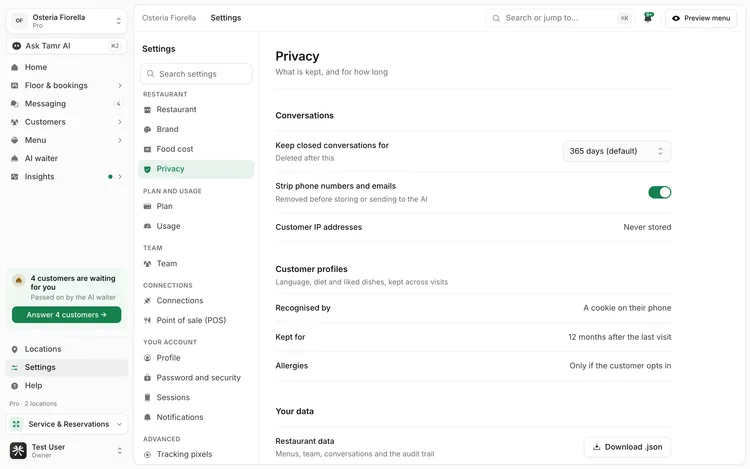
Conversations
Keep closed conversations for30 · 90 · 180 · 365 days · foreverStrip phone numbers and emailsswitchCustomer IP addressesfixedChange a setting and a bar reading Unsaved changes appears; select Save to apply it. Only owners and admins can change these settings; everyone else sees them read-only.
Customer profiles
The AI waiter remembers a returning customer's language, diet and liked dishes, so the next visit starts where the last one ended.
Recognised byfixedKept forfixedAllergiesfixedA customer can erase themselves at any time with Forget me on your menu, which deletes their profile at your restaurant after they confirm.
Download your restaurant's data
Under Your data, Restaurant data downloads everything tamr holds for your restaurant as one file: menus, team, conversations and the audit trail.
- 1Open Privacy
Go to Settings → Privacy and scroll to Your data.
- 2Download
Select Download .json. Each kind of record is capped so the file always arrives complete; if a cap was reached, the message says which records only include the newest ones.
Your own account links to Open profile →, where you export or delete your personal login.
Delete your account or restaurant
Your accountSettings → ProfileYour restaurantSettings → Transfer or deleteDeleting the restaurant removes its menus, conversations and settings for good. Download your data first if you may need it.
FAQ
How long are conversations kept by default?
365 days after the conversation closes. Change it under Settings → Privacy.
Does deleting old conversations change my Insights?
No. Insights keep their totals; you only lose the text of the deleted conversations.
Can a customer delete their own data?
Yes. Forget me on the menu deletes their profile at your restaurant.
I own a restaurant with other people in it. Can I delete my account?
Hand over ownership first under Settings → Transfer or delete, so the restaurant keeps an owner.
Related
Last reviewed October 14, 2026