
Know your customers
The Customers list, its count tiles and lists, a customer's profile, one-by-one WhatsApp, merging records, and what the Free plan shows.
Customers holds everyone you have a record for: people your team added, people who booked, and every phone tamr saw on 2 or more days. Visits are counted, spend never is. Open it from Customers → Customers in the sidebar.
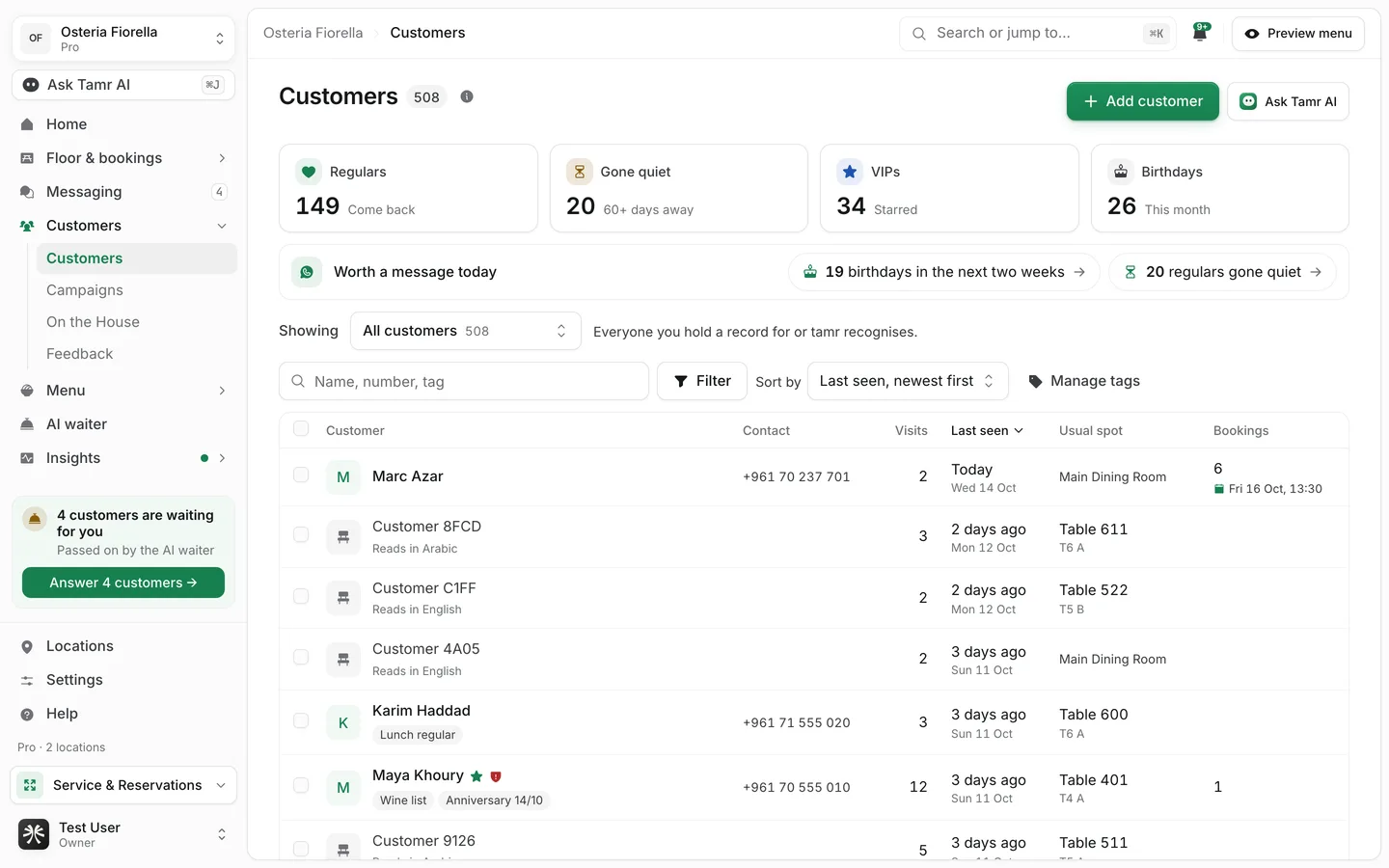
Read the page
Count tilesfilterWorth a message todayshortcutShowinglistTable50 a pageA name only shows when your team wrote it down, the customer gave it in a booking, or they shared it by signing in on the menu.
Find a customer
- 1Search
Type in Name, number, tag to match a name, a phone number or a tag.
- 2Add filters
Select Add filter and pick from four groups: Visits (seen recently, not seen for a while, number of visits, first seen), Their record (name, VIP, tags, Do not book, signed in on the menu), Bookings (upcoming, number of bookings, no-shows) and About them (allergy, dietary preference, menu language, birthday, location). Active filters show as chips; Clear all removes them.
- 3Sort
Use Sort by for Last seen, Visits, Name, First seen, Bookings or No-shows, in either direction.
- 4Save the view
Select Save as a segment to keep the filters as a list of your own. You can keep up to 30 saved lists, with names up to 40 characters.
Add a customer
Select Add customer at the top right. A name or a number is enough. You can also fill in an email, a birthday, a seating preference, an allergy note, tags, a first note, and mark them VIP. Enter phone numbers with the country code. If the number already belongs to a customer, tamr shows you that customer instead of making a second one.
Act on several customers
Tick customers in the table and a bar appears with Add tag, Remove tag, Mark VIP, Remove VIP, Message and Delete. Message takes the ticked customers who have a number into a new WhatsApp campaign. Delete removes your record of them; their bookings stay, without a name.
Tags are up to 32 characters, 20 per customer. Manage tags renames or deletes a tag everywhere at once. Automatic labels such as new, returning, regular and lapsed are worked out from visits and cannot be edited.
Open a customer's profile
Select a customer to open their own page.
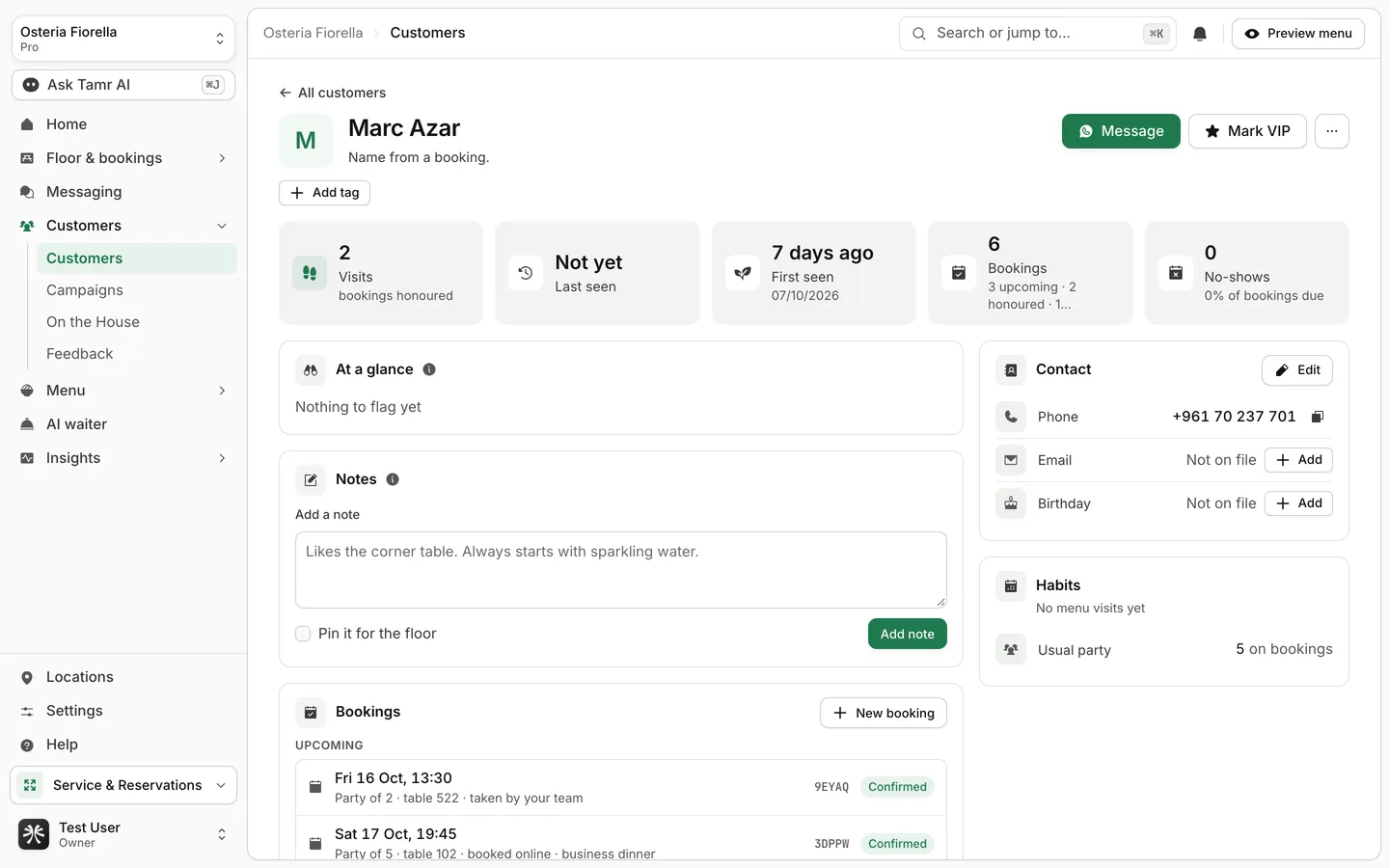
HeaderactionsStat tilesread onlyAt a glancecardNotesteam onlyTimelinecardContactcardHabitscardWhen the customer is in the room right now, an On the floor now strip links to their table on the floor.
Message a customer on WhatsApp
- 1Select Message
On the profile, select Message. tamr opens the campaign builder with this one customer picked.
- 2Write the message
Write it yourself or start from an idea in the library.
- 3Send it from your own WhatsApp
Under Send one by one, select Open WhatsApp. Your WhatsApp opens with the message filled in; you press send there. tamr marks the customer as sent, and you can change that with Mark as not sent.
Sending one message to a whole list in one go needs bulk sending on WhatsApp, which is not set up for restaurants yet. Today every message goes one by one from your own WhatsApp. See Campaigns →.
Merge two records of the same person
Same person? appears on a profile, and on a booking, when a booking was saved with a name only and one customer on file clearly matches. tamr never merges on a name by itself; you decide.
- Merge moves the booking onto this customer.
- Not them keeps the two apart.
Both can be undone from the message that confirms them. To merge two full records, open the ··· menu on a profile and select Merge with another customer. The other record is folded into this one: details this record already has are kept, tags are combined, and both allergy notes stay. Two records with different phone numbers cannot be merged.
The same ··· menu has Do not book (a reason is required and is pinned as a note) and Delete this customer, where you choose between deleting your record and also forgetting the phone.
What the Free plan shows
Full customer profiles are part of Pro. On Free the Customers page still opens and lists everyone, with these limits.
- Only the 3 most recently seen customers tamr recognised by phone can be opened. Other recognised customers show as a blurred row marked Opens on Pro.
- Customers your team added yourselves always open.
- Names and numbers from menu sign-in show as Name and number on Pro.
- Message and Worth a message today lead to Campaigns, which is a Pro page.
FAQ
Why is a customer listed without a name?
tamr recognises a returning phone, but it never guesses a name. A name appears once your team adds it, the customer books with it, or they sign in on the menu.
Does tamr track how much a customer spends?
No. Visits, bookings and no-shows are counted. Spend is not.
What is the difference between Gone quiet and Lapsed?
Both mean a customer who came back at least once and has not been seen for 60 days or more. Gone quiet is the tile on top; Lapsed is the same list in Showing.
Can a customer ask to be forgotten?
Yes. On their profile, open ··· → Delete this customer and choose to forget the phone too. See privacy and data →.
Related
Last reviewed October 14, 2026