
How customers chat with the AI waiter
Opening the chat, starter questions (up to 8), what the waiter can show and do, handovers to staff, and what customers can delete.
When a menu has a published AI waiter, customers see Ask the AI waiter on the menu. Tapping it opens a chat where they ask anything about your food in their own words and get a specific, honest answer.
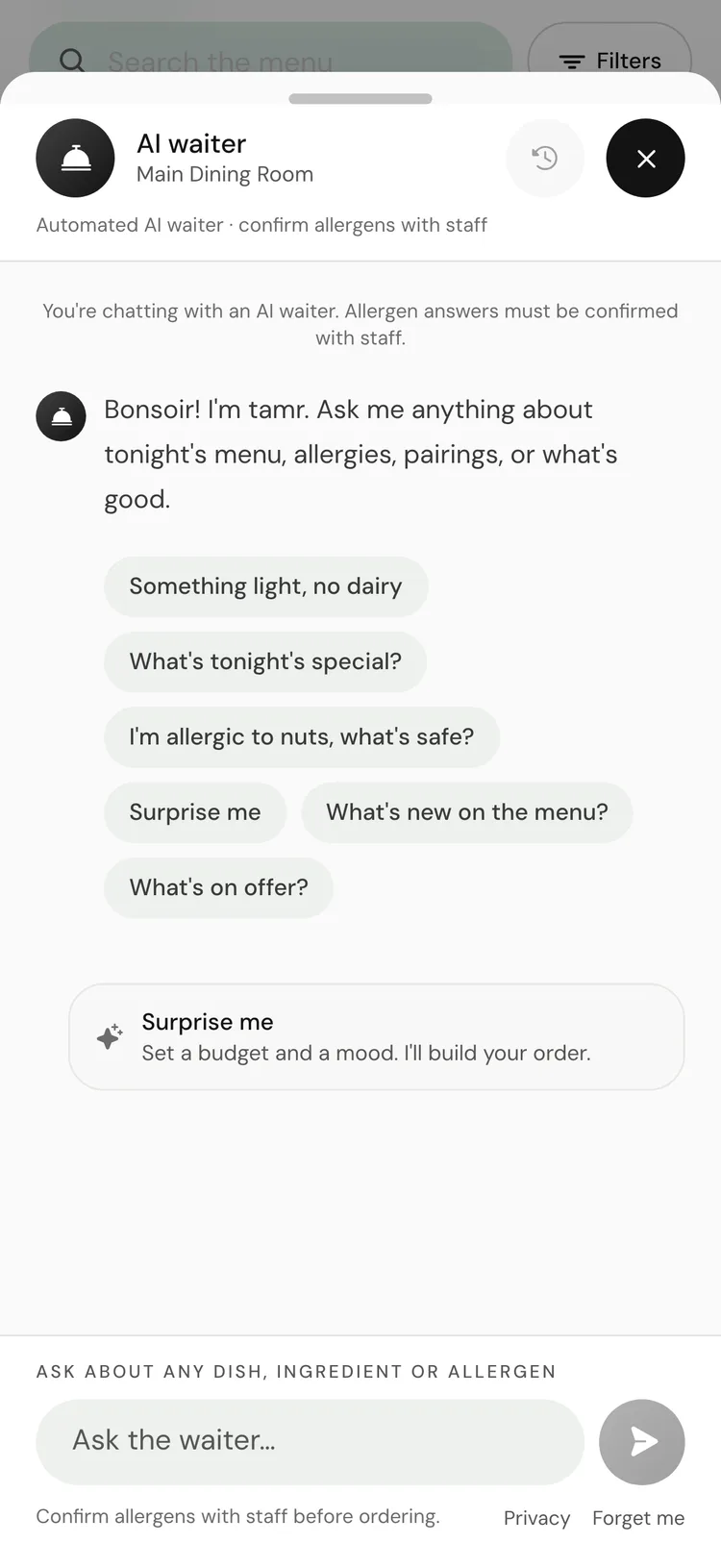
What the customer sees
- A line at the top: Automated AI waiter · confirm allergens with staff.
- Your greeting, or one that matches your tone when you leave it blank.
- Starter questions to tap instead of typing.
- A message box ("Ask about any dish, ingredient or allergen") and, when you allow them, a microphone for voice notes.
- Past chats under Conversations, a New chat button, and Forget me.
Starter questions
Starter questions are the tappable prompts under the greeting. You set up to 8 in the AI waiter editor, under How it talks → Greeting → Questions customers can tap, each up to 64 characters. New waiters start with 4: "What's popular today?", "I have a nut allergy", "Something rich" and "Something light".
Customers see your starter questions in the words you typed. With none set, the chat shows tamr's built-in suggestions in the customer's language. See how it talks →.
Voice notes
With Listen to voice notes on, customers can tap the microphone, speak for up to 30 seconds, and send. The waiter reads what they said and answers in text. The phone asks for microphone permission the first time.
What the waiter can show
Beyond text, the waiter answers with cards, depending on which ones you allow. See chat cards →.
Dish cardsrecommendComparisons and pairingsdecideAllergen-aware pickssafetyQuick replies and diet chipstapLocation infovisitSpecialsProCalling staff from the chat
Handoveron by defaultService requestsoff by defaultYour team cannot type into a customer's chat. An alert means someone walks over. See Messaging →.
Booking a table from the chat
Bookings are a Pro feature. Without them, the waiter answers booking questions from the location's own details, such as a phone number or booking link, if you added them.
When a location takes bookings and The AI waiter takes bookings is on in its booking settings, customers can ask "Can I book a table for Friday?" and the waiter books it in the chat. They see Booking confirmed with a Manage booking link to change or cancel. See bookings →.
Ordering from the table
Ordering from the table needs Pro and tables on your floor plan. There is no switch for it on the menu screen; turn it on through Ask Tamr AI.
When a menu takes orders, the waiter can put dishes on the customer's My table list, marked Added by the AI waiter. It never sends anything itself. The customer reviews the list, confirms their table, adds a note and any allergies, and selects Send to the team. They then follow the order's status, from Sent to Got it to Served. See orders →.
Without ordering, My table is a list the customer shows their server.
When the waiter cannot answer
- Off-menu requests get the closest real dish or a polite "not on our menu", whichever you chose.
- If a location has passed its monthly fair use, a new chat says "Our waiter is resting for now. A member of staff will be happy to help you." Chats already under way continue. See fair use →.
Privacy for the customer
Customers never need an account, a name or an email to chat. tamr keeps their conversations and a light taste profile (diets, allergens they chose to save, past picks) on your behalf, so the waiter can pick up where it left off next visit. Phone numbers and emails are removed from messages before they are stored or sent to the AI, unless you turn Strip phone numbers and emails off in Settings → Privacy.
Forget me in the chat permanently deletes what your restaurant holds about that customer, and their next visit starts fresh. See privacy and data →.
FAQ
Why don't my customers see the chat?
The menu must be published and a published waiter attached. See attach and publish →.
Is the chat different on the Free plan?
No. Customers get the same AI waiter on Free. Only the Pro extras (bookings, ordering, specials) depend on the plan.
Does the waiter ever make up a dish?
No. It only talks about what is on your menu.
Related
Last reviewed October 14, 2026